Yoast SEO plugin – Guide to the Beginner Part 1
In the ever-evolving world of digital marketing, mastering Yoast SEO plugin has become a must for every beginner who wishes to improve their website’s visibility and ranking on Google. Yoast SEO is one of the most powerful and user-friendly WordPress plugins that helps optimize your website content for search engines, ensuring that your articles meet the highest SEO standards.
The plugin simplifies complex SEO techniques by providing color-coded indicators, readability analysis, and keyword optimization guidance directly within the WordPress editor. Whether you are a blogger, content marketer, or business owner, understanding how to set up and use Yoast SEO can significantly boost your online presence.
In this first part of our series, we’ll cover everything a new user needs to know — from installation and configuration to understanding the key features that make this plugin a must-have for SEO success.


What Is the Yoast SEO Plugin and Why Is It Essential for Beginners?
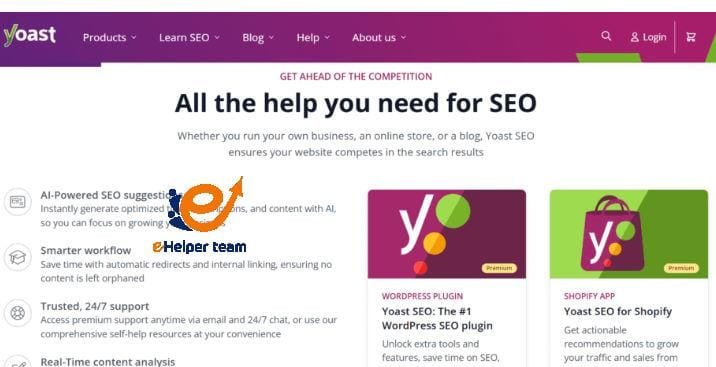
The Yoast SEO plugin is more than just another WordPress add-on — it’s a complete SEO toolkit designed to help users optimize their websites effortlessly. It provides both beginners and professionals with essential features that make it easier to write SEO-friendly content without needing deep technical knowledge.
Here’s why it’s essential for every WordPress user:
On-Page SEO Optimization:
Yoast allows users to optimize meta titles, descriptions, and focus keywords directly from the page editor. It provides instant feedback on keyword usage, sentence structure, and link distribution.Readability Analysis:
The plugin helps writers ensure their content is easy to read by checking sentence length, paragraph structure, and transition word usage.Snippet Preview:
Before publishing, Yoast lets you preview how your post will appear on Google — showing both mobile and desktop versions.Automatic XML Sitemaps:
With just one click, Yoast generates a sitemap that search engines like Google and Bing can use to crawl your website effectively.Control Over Indexing and Canonical URLs:
Yoast provides options to control which pages are indexed and helps avoid duplicate content issues by managing canonical links.
Yoast’s user-friendly interface is designed to turn complex SEO tasks into simple, actionable steps. For beginners who find SEO intimidating, this plugin serves as an intelligent assistant that helps them write better, rank higher, and maintain consistency across their content.
Step-by-Step Guide: How to Install and Set Up Yoast SEO Plugin
Setting up the Yoast SEO plugin is simple, but doing it right from the beginning makes all the difference. Follow these steps to install and configure it effectively:
Step 1: Installing the Plugin
Log in to your WordPress dashboard.
Go to Plugins → Add New.
In the search bar, type “Yoast SEO”.
Click Install Now, then Activate.
Once activated, Yoast will appear in your WordPress sidebar.
Step 2: Initial Configuration Wizard
Yoast provides a setup wizard that simplifies the configuration process. It will ask for:
Website Type: Choose whether your site is a blog, portfolio, or eCommerce store.
Organization or Person Details: Enter your site’s basic information to help search engines display it correctly.
Visibility Settings: Decide whether your posts, pages, and categories should be indexed by Google.
After completing these steps, Yoast automatically applies the recommended SEO settings for your website.
Step 3: Linking Google Search Console
Connecting Yoast SEO with Google Search Console gives you insights into how your site performs in search results. It helps detect errors, broken links, and indexing issues quickly.
Exploring the Key Features of Yoast SEO Plugin
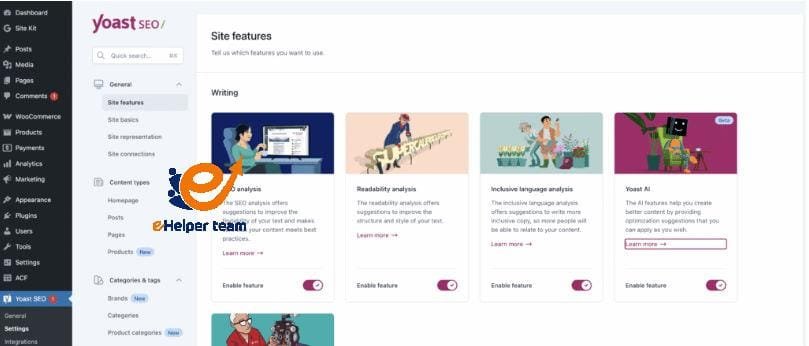
The strength of Yoast SEO lies in its variety of tools and features that work together to optimize your site’s content efficiently. Below are the most important ones every beginner should know:
1. Focus Keyphrase Optimization
This feature analyzes how well your post targets a specific keyword. For example, if your main keyword is Yoast SEO plugin, the tool will evaluate its placement in the title, headings, URL, and body text.
2. Readability Analysis
One of Yoast’s standout tools, this section checks sentence length, passive voice, transition words, and paragraph variety to ensure your content is engaging and easy to read.
3. SEO Analysis
This section provides real-time feedback with color indicators:
Green: Good SEO performance.
Orange: Needs improvement.
Red: Poor optimization.
It’s a simple yet effective system for guiding beginners through SEO best practices without feeling overwhelmed.
4. Content Insights and Cornerstone Content
Yoast identifies your most important articles — called cornerstone content. These are the pages that define your site’s niche and should contain internal links pointing to related articles.
5. Social Media Integration
Yoast also lets you control how your content appears when shared on platforms like Facebook and Twitter by setting custom images, titles, and descriptions.
Common Mistakes Beginners Make When Using Yoast SEO Plugin
Even though the Yoast SEO plugin simplifies search engine optimization for WordPress users, many beginners make avoidable mistakes that limit its full potential. Understanding these pitfalls is essential for achieving better rankings and ensuring your content is truly optimized.
1. Overusing Keywords (Keyword Stuffing)
Many new users mistakenly believe that repeating the keyword multiple times will improve their ranking. In reality, keyword stuffing can hurt readability and lead to Google penalties. Instead, maintain a natural keyword density of around 1%–1.3%.
2. Ignoring Readability Analysis
Some users focus solely on the SEO analysis and neglect the readability tab. However, search engines favor content that provides value to readers. Make sure your text flows smoothly and is easy to understand.
3. Forgetting to Update Meta Descriptions
Every post should have a unique and compelling meta description. Beginners often rely on automatic generation, but writing one manually helps increase click-through rates.
4. Not Using Internal Links
Internal linking improves site structure and guides search engines through your most valuable pages. Use Yoast’s cornerstone content feature to interlink your best-performing articles.
5. Skipping Regular Plugin Updates
Yoast SEO releases frequent updates to improve functionality and stay in line with Google’s latest algorithms. Make it a habit to update the plugin regularly to avoid performance issues or outdated SEO practices.
Avoiding these common mistakes can dramatically improve your SEO performance and keep your website healthy and visible on search engines.
Best Practices for Using Yoast SEO Plugin Effectively
To take your optimization even further beyond what Yoast SEO offers, you can also explore 5 Basic SEO Tips To Improve Your Website to learn additional strategies that enhance your website’s performance and visibility.
1. Choose a Primary Focus Keyphrase for Every Post
Each post should target one main keyphrase that reflects its central idea. Yoast helps analyze this phrase across your content, ensuring you maintain consistency and relevance.
2. Write for Humans, Not Just Search Engines
Even though Yoast provides optimization guidelines, remember that engaging content always comes first. Balance SEO with storytelling — that’s the true formula for ranking and retaining readers.
3. Use the SEO and Readability Indicators Together
Aim for both indicators to show green. If your content is optimized but hard to read, users will leave your page quickly, increasing your bounce rate.
4. Optimize Images with Alt Text
Add descriptive alt text to your images using target keywords. It helps search engines understand your visual content and improves accessibility.
5. Update and Refresh Old Content
SEO isn’t a one-time effort. Yoast’s content analysis tool can help you revisit older posts, identify weak points, and refresh them with new keywords and internal links.
By applying these best practices, you’ll gradually improve your website’s performance and maintain strong rankings across all pages. For a deeper understanding of SEO principles beyond the plugin, explore, which covers general optimization strategies in detail.
The Real Impact of Yoast SEO Plugin on Website Performance
The results of using Yoast SEO plugin go far beyond simple keyword management — it fundamentally changes how your website interacts with search engines. When used correctly, Yoast can lead to measurable improvements in organic traffic, click-through rates, and content engagement.
1. Improved Organic Rankings
By optimizing on-page elements like titles, URLs, and meta descriptions, your pages are more likely to appear higher in search results.
2. Better User Experience
The plugin’s readability and structure analysis ensures your content is user-friendly, leading to longer page visits and lower bounce rates.
3. Enhanced Content Consistency
Yoast standardizes how SEO is applied across your website, ensuring that all posts follow the same optimization logic — an essential factor for building long-term authority.
4. Higher Visibility in Social Media
With Yoast’s social preview tools, your posts appear more professional and attractive when shared, which helps improve your site’s reach beyond organic search.
In essence, Yoast SEO doesn’t just optimize your website — it builds a stronger, more coherent digital identity.
Frequently Asked Questions (FAQs)
Here are some of the most common questions beginners ask about the Yoast SEO plugin, along with practical answers:
1. What is the main purpose of the Yoast SEO plugin?
Yoast SEO helps website owners optimize content for search engines, improving their site’s visibility and structure without needing technical SEO knowledge.
2. Is Yoast SEO free or paid?
Yoast SEO offers both a free version and a premium one. The free version includes all essential features, while the premium version adds advanced tools like redirect management and multiple keyphrase targeting.
3. Can beginners use Yoast SEO easily?
Yes. Yoast is designed with beginners in mind, offering intuitive guidance, clear indicators, and built-in tutorials.
4. How often should I update Yoast SEO?
You should update Yoast whenever a new version is released to stay compatible with the latest Google algorithm updates.
5. How does Yoast SEO affect website speed?
The plugin is lightweight and optimized for WordPress, meaning it doesn’t significantly affect site loading time.
6. What are Focus Keyphrases in Yoast?
Focus keyphrases are the main words or phrases that describe what your page is about — Yoast analyzes how effectively they’re used across your content.
7. How can I improve my Yoast SEO score?
Focus on writing naturally, adding relevant internal links, optimizing meta descriptions, and ensuring readability.
8. Does Yoast help with off-page SEO?
Not directly. Yoast primarily manages on-page SEO but supports off-page strategies by improving content quality, which encourages backlinks.
9. Can I use Yoast SEO for non-English websites?
Yes, Yoast supports multiple languages and works well for international SEO strategies.
10. Is Yoast SEO worth it for professional websites?
Absolutely. Even professionals rely on Yoast SEO to maintain consistent optimization standards and improve overall site visibility.
Conclusion
Mastering the Yoast SEO plugin is the first big step toward building an optimized, professional WordPress website. As you’ve learned in this first part of our series, understanding the basics — from installation and setup to avoiding common mistakes — lays the foundation for SEO success.